

TL;DR: YouTube CTR is the percentage of viewers who click your video after seeing its thumbnail. YouTube Studio reports it as impressions click-through rate. Half of all channels sit between 2% and 10%. Read your number alongside impressions and traffic source before you change anything.
Getting impressions is easy. Converting them into actual clicks is the tough part.
YouTube CTR is the number that measures that gap. CTR is a common term across digital marketing, used in ads, email, and search. On YouTube, it carries more weight because video delivers a message faster and more clearly than text, and the viewer decides in about a second whether your video is worth their time.
That one second is what your CTR records. Most creators read the number wrong, panic, and redesign a thumbnail that was never the problem.
This guide shows you what YouTube CTR means, how to find it in YouTube Studio Analytics, how to judge it, and how to improve it.
What is YouTube CTR?
YouTube CTR is the percentage of people who clicked your video after seeing its thumbnail. Inside YouTube Studio, it appears as impressions click-through rate, and it answers one question: out of everyone who saw your thumbnail, how many chose to watch?
The formula is simple.
Clicks ÷ Impressions × 100 = CTR
Show your thumbnail 10,000 times, get 400 clicks, and your CTR is 4%.
One detail catches many creators out. Dividing total views by total impressions will not give you the CTR YouTube reports. According to YouTube’s Help documentation, the click-through rate is calculated from views that come from counted impressions, while many views come from sources that do not register an impression.
Your reported figure covers only part of your traffic, while the YouTube algorithm considers CTR alongside other signals, which makes the next question the important one.
What Counts as a YouTube Impression?
An impression is counted when your thumbnail is on screen for more than one second and at least 50% of it is visible. Both conditions have to be met. A thumbnail that flies past during a fast scroll registers nothing.
Where the thumbnail appears decides the rest. YouTube’s impressions documentation splits the platform into two lists.
| Impressions are counted on | Impressions are not counted on |
| YouTube search | External websites, apps, and embeds |
| YouTube homepage, including autoplay | The YouTube mobile website |
| Feeds: subscriptions, trending, history, Watch Later | YouTube Kids and YouTube Music apps |
| “Up Next” recommendations beside the player | Cards and end screens inside the player |
| Playlists | Email and notifications |
| Computers, TVs, game consoles, Android, iPhone, iPad | Videos playing in a background tab |
Two exclusions surprise people. Notifications and email never count, so they are not part of YouTube SEO CTR data. Embeds do not count either, which is why a video shared widely on other websites can have more views than impressions.
How to Check Your YouTube CTR in YouTube Studio
Follow these steps to find your click-through rate at the channel level.
- Sign in to YouTube Studio.
- Select Analytics from the left menu.
- Open the Content tab from the top menu.
- Choose Videos, Shorts, Posts, or Playlists to filter.
- Read the key metrics card at the top, where impressions click-through rate sits beside impressions, views, and average view duration.
Those four numbers belong together. Reading CTR without the impression count beside it is the most common mistake creators make with this metric.
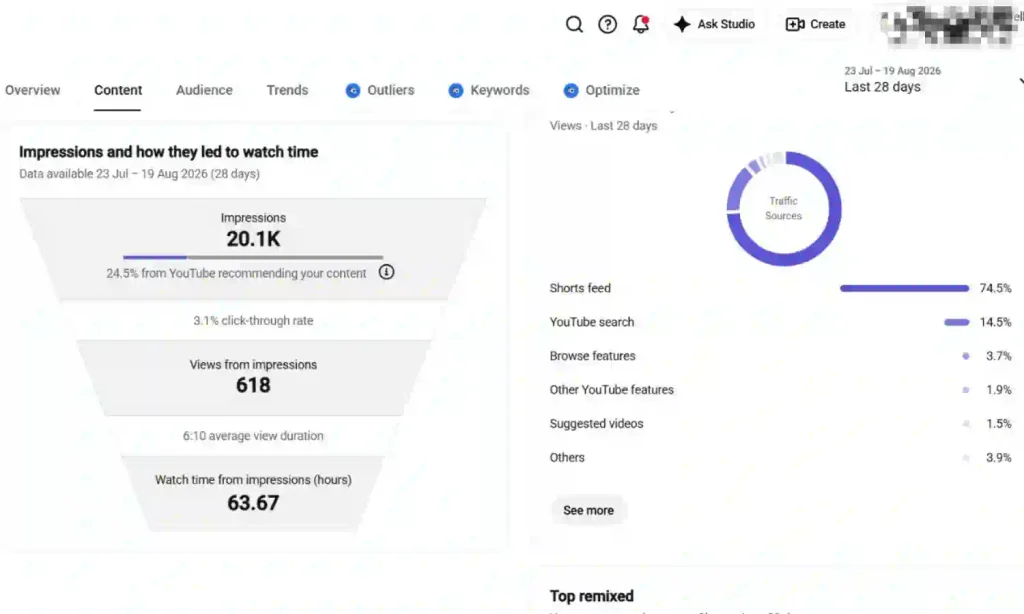
For a single video, open Analytics, then select the Reach tab. In the Content tab, select All to open the “Impressions and how they led to watch time” report. It shows how impressions turn into clicks and watch time.
What is a Good YouTube CTR?
Half of all channels and videos on YouTube have an impressions CTR between 2% and 10%, according to YouTube’s click-through rate FAQs. That is the only benchmark YouTube publishes.
It is a wide range, and YouTube adds some important qualifiers:
- New channels: CTR can fall well outside the range.
- Videos less than a week old: Early data can vary significantly.
- Videos with fewer than 100 views: Small samples can produce unreliable percentages.
You will find plenty of tables online that suggest a target CTR based on your subscriber count or niche. YouTube does not publish those benchmarks. They usually come from tool companies analyzing their own users, so don’t treat them as universal standards.
Use the 2% to 10% range as a reference, not a target. The better benchmark is your own channel: compare similar videos, traffic sources, and time periods. A 4% CTR can be strong for one video and weak for another depending on where the impressions came from.
Why Your Click-Through Rate Drops as Your Video Reaches More People
A falling CTR alongside rising impressions usually means distribution is working, not that your packaging failed.
CTR changes depending on where your impressions come from and how many people see them.
- Impression Volume: More impressions, especially from the homepage, usually mean a lower CTR because the video is reaching a broader audience.
- Traffic Source: Videos getting most impressions from warmer sources, such as your channel page, usually have a higher CTR.
- Audience Size: Fewer impressions can mean higher CTR and average view duration because the video is reaching a smaller, more familiar audience.
Looking at the numbers this way changes the picture. A 12% CTR on 800 impressions mostly tells you that your existing audience responded well. A 4% CTR on 60,000 impressions tells you that YouTube reached a much broader audience, and thousands of those viewers still clicked.
The second video is winning. Only the first one’s number looks better for YouTube Channel Optimization.
How to Diagnose a Low YouTube CTR
Work through these four checks in order before you change a single thumbnail.
1. Impression Count: Check the number of impressions first. YouTube advises against judging CTR too early or reacting to small changes that may not be statistically meaningful.
2. Traffic Source: Open the Reach tab and check “How viewers find this video.” Search, browse, and suggested traffic can produce very different CTRs, so the overall number may not show where the problem is.
3. Average View Duration: Compare it with your CTR. A high CTR with low average view duration can mean viewers clicked but did not find what they expected.
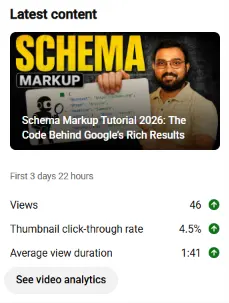
4. What to Change: Make changes only after checking impressions, traffic source, and viewer retention. If impressions are healthy, browse traffic is strong, and viewers stay, your title or thumbnail may need work.
One thing to avoid: Do not manually swap thumbnails on the same video and compare the results. YouTube warns that this is unreliable because each version may reach a different audience, so the difference may come from the traffic source rather than the thumbnail.
How to Improve Your YouTube CTR
Three levers move your YouTube CTR. Work them in this order.
Fix the thumbnail first
Your thumbnail carries most of the click decision, so upload it at the quality YouTube now recommends. YouTube’s thumbnail guidance asks for 3840 x 2160 pixels with a minimum width of 640, a 16:9 aspect ratio, and JPG, GIF, or PNG format. Size limits depend on your device: 2 MB from mobile, 50 MB from desktop. Most advice online still quotes the old 1280 x 720 standard.
Design for the viewers you are actually trying to reach. The thumbnail should match how familiar those viewers are with your content.
- Subscribers: Use familiar faces, branding, and cues they already recognize.
- Casual viewers: Use clear actions, expressions, and visuals that are easy to understand at a glance.
Keep the composition simple. Bold colors and one clear focal point help the thumbnail stand out, while too much detail becomes difficult to see at thumbnail size.
For vertical videos: A 16:9 custom thumbnail may be replaced by an auto-generated 4:5 thumbnail on the Home, Explore, and subscription pages. Your custom thumbnail can still appear on the watch feed and desktop, but the surfaces generating the most impressions may show the 4:5 version instead.
Match the title to how people find the video
Your title has two main jobs, and you need to choose the one that fits the video.
- Searchable titles: Tell viewers clearly what the video is about. These work well for tutorials and how-to videos.
- Curiosity-based titles: Make viewers want to know more. These work better for stories and videos aimed at people who are not searching for the topic.
Keep the most important words at the start because viewers may not see the full title. Put your brand name or episode number at the end. Keep the title accurate too. If the title promises something the video does not deliver, viewers will leave quickly.
Make the thumbnail and title work as one unit
Viewers see both at the same moment, so saying the same thing twice wastes half your space. Let the thumbnail carry the emotion or the result, and let the title carry the specifics. Together they should tell a viewer exactly what they get.
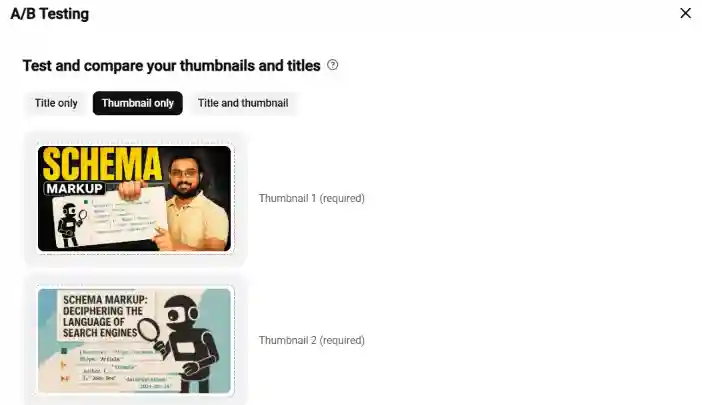
How to A/B test Your Titles and Thumbnails
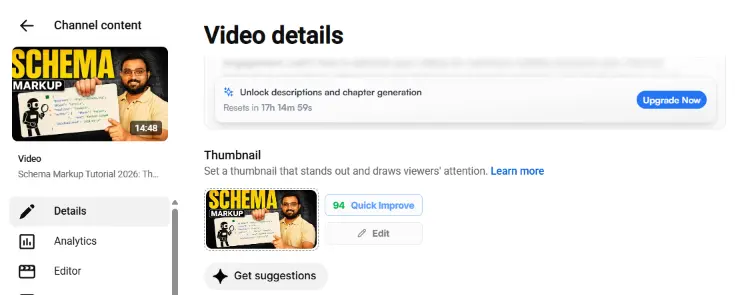
YouTube has a built-in A/B testing tool, and it is the only reliable way to compare packaging on the same video.
Eligibility is limited. YouTube’s A/B testing documentation confirms it runs on desktop YouTube Studio only, requires advanced features to be enabled, and excludes Shorts, scheduled lives, Premieres before they end, private videos, videos made for kids, and mature content.
- Sign in to YouTube Studio on a computer and select the video you want to test.
- Click A/B testing in the Title box or under Thumbnail.
- Choose Title only, Thumbnail only, or Title and thumbnail.
- Upload up to three versions, then click Done.
- Track it under Analytics, then Reach, then Manage test.
Tests finish within two weeks. Editing the title or thumbnail mid-test stops it, and you have to start again.
This is the part that should change how you look at CTR. YouTube chooses the better title or thumbnail based on watch time, not just clicks. Its documentation says these tests focus on overall watch time rather than CTR because titles and thumbnails should help viewers understand what the video offers, not simply get them to click. YouTube also points out that third-party tools focused only on clicks can choose a different winner.
The platform’s own testing tool refuses to reward clicks alone. Treat your click-through rate the same way.
Three rules from YouTube itself:
- Test older videos first: A weak variant then costs you far less than it would on a fresh upload.
- Make versions genuinely different: Near-identical options drag tests out with no clear result.
- Upload every thumbnail at 720p or higher: One low-resolution entry downscales the whole experiment to 480p.
Results are shown as Winner, Performed the same, or Inconclusive. An Inconclusive result is normal. It usually means the video did not get enough impressions to clearly determine which option performed better.
Why a High YouTube CTR Alone Won’t Grow Your Channel
Clicks start the process, but watch time determines whether it continues. YouTube recommends a video when it is relevant to the viewer and when average view duration shows that people find it interesting. Clickbait can lower average view duration, which can reduce future recommendations. A thumbnail that wins the click but loses the viewer can shrink future impressions, even when the CTR still looks healthy. To grow a YouTube channel fast, you need both a strong click-through rate and a video that keeps viewers watching.
Aim for a strong rate on a growing impression count. That combination drives growth. A high percentage on shrinking impressions is not.
Frequently asked questions
1. Why is my YouTube CTR dropping?
Usually because YouTube is showing your video to a wider, colder audience. Homepage impressions naturally convert lower than channel page or subscriber impressions. Check your traffic source before assuming the thumbnail failed.
2. What is a good YouTube CTR for a new channel?
YouTube publishes no separate benchmark for new channels. It states that channels and videos under a week old, and videos below 100 views, swing well outside the usual 2% to 10% range in both directions.
3. Do YouTube Shorts have a click-through rate?
Shorts play automatically in the vertical feed rather than being clicked, so impressions CTR does not apply. YouTube reports “stayed to watch” instead, measuring how often viewers continue past the opening seconds.
4. Can your YouTube CTR be too high?
A very high rate on few impressions usually means only loyal subscribers are seeing the video. High CTR paired with low average view duration and falling impressions signals clickbait, which reduces recommendations.
5. How long should I wait before judging a video’s CTR?
Wait until the video has collected a substantial number of impressions. YouTube advises against checking click-through rate immediately after uploading and against reacting to small variations that are not statistically significant.
The Bottom Line
Treat YouTube CTR as a diagnostic, not a score. The number shows whether your packaging is connecting with viewers, but it does not tell you what needs fixing. Impressions, traffic source, and average view duration provide the context you need to find the problem.
Run these four checks on your last five uploads before changing anything. You may find that the thumbnail was never the problem.
Also Read: What is YouTube SEO? 7 Steps to Optimize Your Video in 2026