

TL;DR: Full YPP ad-revenue eligibility needs 4,000 valid public watch hours in the last 12 months plus 1,000 subscribers. Only public long-form videos count. Shorts feed views, private, unlisted, deleted videos and ad campaigns do not. Public livestreams count once the replay stays public. The fastest route combines high-retention long-form videos, strong thumbnails, search-focused topics, playlists and internal promotion.
4000 Watch Hours on YouTube is 240,000 minutes of people actually watching your videos. No setting speeds that up, and no button skips it.
Most new channels need close to a year of steady long-form uploading to get there, and plenty never do. CreatorDB measured 1.47 million active channels in August 2026 and estimated that around half of the channels that already have 1,000 subscribers still do not produce 4,000 watch hours in a year.
Two things separate the channels that make it. Math comes first, because video length and average view duration decide how many views you actually need. The rules come second, because a large share of watch time never counts, and most creators learn that far too late.
Here is how both work, then the ten changes that move the number fastest.
What Counts as a Watch Hour on YouTube?
A qualified watch hour is time viewers spend watching your public long-form videos. Nothing else counts toward the threshold, and YouTube lists the exclusions plainly.
| Counts | Does not count |
| Public long-form videos | Shorts views from the Shorts feed |
| Live stream replays kept public | Private and unlisted videos |
| Premieres, once they become public videos | Deleted videos |
| Watch time from any country | Views from paid ad campaigns |
Two of those cost creators the most hours.
Paid ad campaigns: running YouTube ads to push a video does not move you closer to monetization, because YouTube removes that watch time from the threshold calculation.
Deleted videos: Removing an old video removes its hours from your total on the same day. Check a video’s watch time before you delete it, even if you dislike how it turned out.
How many Watch Hours Do You Need to Get Monetized?
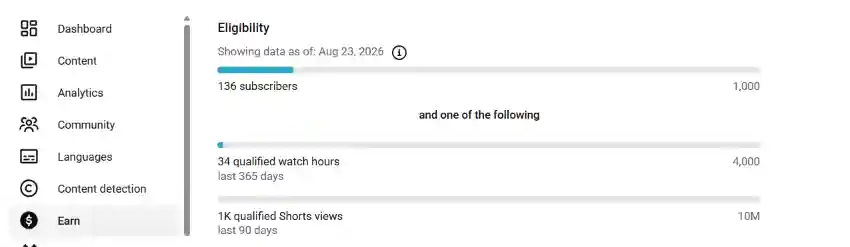
You need 4,000 qualified watch hours in the last 12 months plus 1,000 subscribers for full monetization, which covers ad revenue and YouTube Premium revenue sharing.
There is an earlier tier as well. At 500 subscribers with 3,000 qualified watch hours in the last year, you can apply for fan funding features such as channel memberships, Super Thanks, and YouTube Shopping.
One date matters more than the rest. From February 1, 2027, new applicants will need 8,000 qualified watch hours in the last 365 days instead of 4,000. Channels already accepted into the Partner Program keep their status, and the 500 subscriber tier does not change. (Source: Changes to the YouTube Partner Program)
So if you are anywhere near 4,000 hours right now, applying before that date is the highest-value deadline on your calendar.
How to get 4,000 watch hours on YouTube mathematically
Watch hours come from one calculation:
Watch hours = (views x average view duration in minutes) ÷ 60
Break 4,000 hours down and it stops feeling abstract. You need 240,000 minutes in a year, which is 20,000 minutes a month, or roughly 77 watch hours a week.
Average view duration is the lever most creators ignore. Doubling it halves the views you need for the same result.
| Average view duration | Views needed per month |
| 3 minutes | 6,667 |
| 5 minutes | 4,000 |
| 8 minutes | 2,500 |
| 12 minutes | 1,667 |
Live streams change the arithmetic completely. A two-hour stream with 25 people watching at any moment produces 50 watch hours in one sitting. Run that weekly and you add roughly 2,600 hours over a year, which is most of the threshold from a single habit.
Put the two together with real numbers. A channel getting 1,500 views a month at 5 minutes average view duration earns 125 watch hours a month, which puts 4,000 hours around two and a half years away. Add one weekly two-hour stream with 20 viewers, worth about 172 hours a month, and the same channel gets there in roughly 13 months.
10 hacks to get 4,000 Watch Hours Faster
1. Fix your first 30 seconds
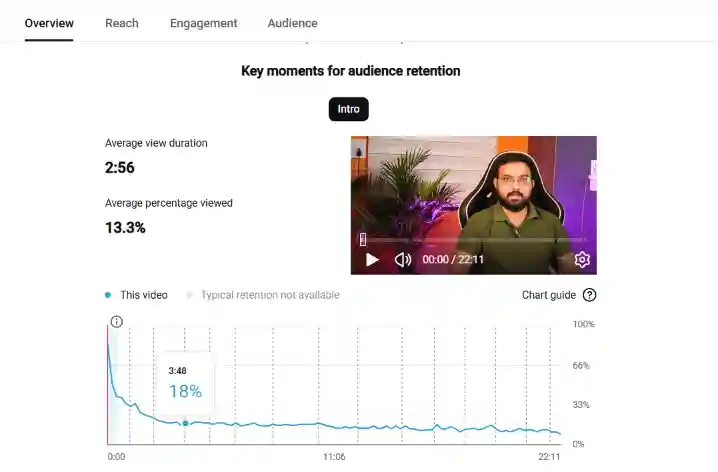
Open YouTube Studio, click any video, then Analytics and Engagement. The retention graph shows exactly where people leave. A steep fall before the 30-second mark means your opening is the problem, not your topic.
Cut the welcome, the logo animation and the “in today’s video” setup. Start with the result, the answer, or the finished thing, then explain how you got there. Viewers you keep past 30 seconds are worth minutes each, not seconds. This is what short-form video content does best.
2. Make longer videos, but only if people stay
A 20-minute video watched to 25% gives you 5 minutes. Trim it to 10 minutes with 70% retention and you get 7 minutes plus a stronger signal. Extra length only helps when the extra minutes hold attention.
Sort your videos by average view duration in YouTube Studio Analytics. Whatever length sits at the top is your working range, so make more videos there. Padding a video with recaps and repeated points to reach a target runtime does the opposite of what you want.
3. Make videos people search for all year
Tutorials, explanations and how-to topics keep earning watch hours months after publishing. Trend videos spike for a week and then go quiet.
Choose topics people look for in any month: how to do a task, what a term means, why something happens. Ten of those running in the background will out-earn thirty trend videos, and they keep your rolling 12-month window topped up while you work on something else. This approach also strengthens your YouTube Channel Optimization over time.
4. Go live every week
Live streams add watch hours in blocks rather than trickles. Q&As, work sessions, tutorials done live and community catch ups all work, so pick a slot you can actually keep.
One detail decides whether those hours count. The replay has to stay public. YouTube archives streams under 12 hours automatically, but archives from mobile streams are set to private by default, so open Studio, click Content, then the Live tab, and confirm visibility after every stream.
5. Turn big uploads into premieres
A premiere schedules your video as a live event with live chat, then leaves it on your channel as a normal public video. One upload gives you the launch spike and the long tail.
Save premieres for videos you would promote anyway. Set the time, tell your audience the day before, and be in the chat while it plays. Use YouTube SEO to extend its reach.
6. Build playlists that play on their own
When someone finishes a video inside a playlist, the next one starts by itself. One decision to watch turns into three or four videos.
Group your videos into themed playlists of five to ten, ordered so each one leads into the next: beginner to advanced, or part one to part five. Without playlists, every viewer has to decide what to watch next, and most of them decide to leave.
7. Tell viewers what to watch next
End screens only appear after many viewers have already gone. Saying it out loud, while people are still watching, works far better.
Around the point where you finish the main idea, name the next video and say why it helps. Something like “if you want the exact setup I use for this, I walk through it here” is enough. Point to a video that continues what they just learned, not your most popular upload.
8. Add end screens to every video
End screens run in the last 5 to 20 seconds. Keep the layout simple with one video and a subscribe button, because too many choices lead to no choice at all.
Pick the video closest to what the viewer just watched, or use the “best for viewer” option and let the YouTube Algorithm choose. Then stop talking while the end screen is on screen so people notice it.
9. Add captions and subtitles
Plenty of people watch with the sound off, so your opening has to land without audio. Captions also give YouTube text to index, which helps your videos get found for the topics you actually cover.
Studio generates a transcript automatically. Open it, correct the names and technical words, and publish it. Translated subtitles then open your videos to viewers in other languages, which widens the pool your watch hours come from.
10. Check that your videos are public
Hours you already earned may be sitting in videos that do not qualify. Go to Studio, click Content, and read the visibility column. Anything unlisted or private is contributing nothing toward monetization.
Check the Live tab as well, since saved streams are the most common place hours go missing. And never buy watch hours. YouTube’s fake engagement policy bans artificial traffic; that traffic is not counted, and it can cost you the channel.
How to check your watch hours in YouTube Studio
- Sign in to YouTube Studio.
- Click Earn in the left menu.
- Read your watch hours and subscriber progress against the joining requirements.
Then open Analytics and note your average view duration. Rising means every new video is working harder for you. Flat means retention needs fixing before publishing more will change anything.
Frequently asked questions
1. Do YouTube Shorts count toward 4,000 watch hours?
No. Shorts views from the Shorts feed do not count toward the 4,000-hour threshold. Creators using Shorts have a separate route: 1,000 subscribers plus 10 million qualified Shorts views in 90 days.
2. Can you buy YouTube watch hours?
No. YouTube’s fake engagement policy bans anything that artificially inflates metrics. Purchased traffic is not counted, and it can trigger strikes or channel termination, so the money buys nothing but risk.
3. Do views from YouTube ad campaigns count?
No. YouTube excludes watch hours gained through ad campaigns from Partner Program thresholds. Paid promotion can still bring real viewers who return later, but the campaign views themselves add nothing to your 4,000 hours.
4. How many minutes is 4,000 watch hours?
4,000 watch hours equals 240,000 minutes of viewing across your public videos. Spread over a year, that works out to roughly 20,000 minutes a month, or about 77 watch hours every week.
5. What happens if my watch hours drop after I apply?
Nothing. YouTube reviews your channel once you meet the threshold and apply, so a later drop does not cancel the review. Changing video privacy or deleting videos can still affect your application.
6. Do watch hours expire?
Yes. YouTube counts a rolling 12-month window, so hours earned more than a year ago drop off your total. Your count never resets, but it can fall if uploads stop.
Start Here
Check your visibility settings today. Nothing else adds watch hours without new work, and most channels find something sitting unlisted.
After that, work to one number. Seventy-seven watch hours a week gets you to 4,000 in a year. Book a live stream slot, publish one searchable video a week, and measure against that target instead of guessing.
Also Read: YouTube Keyword Research: How to Find Keywords for Your Videos