


YouTube decides what your video is about before a single person watches it.
According to YouTube’s own explanation of how search works, the YouTube Algorithm estimates relevance by looking at how well your title, tags, description, and video content match what someone typed into the search bar. Your words are doing real work in there.
YouTube keyword research is how you find the right ones. Get the phrase right, and a video keeps earning views months after upload, because people keep searching long after the notification bell goes quiet.
This guide walks you through the whole process using free tools that YouTube and Google already hand you. No paid software, no guessing.
What is YouTube Keyword Research?
YouTube keyword research is the process of finding the exact phrases people type into YouTube search, then building a video around one of them. The aim is not a long list. One phrase with real demand that your video can answer better than everything currently ranking is worth more than a hundred phrases you collected and never used.
A keyword that is huge on Google can be small on YouTube, and it happens the other way around just as often. People open Google to read and open YouTube to watch, so “best project management software” pulls a searcher toward a comparison article, while “how to set up a Trello board” pulls them toward a video.
Web search keyword tools can give you numbers that mean little on YouTube, so treat YouTube keyword research as its own part of YouTube SEO, with its own data and sources.
How to do YouTube Keyword Research
Five steps, in this order:
1. Seed Topic: Start with a short list of broad topics your channel can cover well.
2. YouTube Search Suggestions: Expand each seed topic using YouTube’s search suggestions to find related queries.
3. YouTube Studio Trends: Check the Trends tab in YouTube Studio to validate real audience demand.
4. Google Trends: Compare search interest by setting Google Trends to YouTube Search.
5. YouTube SERP: Search the keyword directly on YouTube and review the results before committing to the topic.
Steps two through five take a few minutes each. Run all of them before you write a script.
Step 1: Start with topics your channel can cover well
Write down five to ten topics you could make a genuinely good video about this week. No tools yet, just a list.
Demand is only half of the equation. A phrase with 50,000 monthly searches does nothing for you if your video ends up the fifth best answer on the page. Good YouTube keyword research starts with what you can deliver, then hunts for demand inside that.
Keep these seeds broad. “Email marketing”, “kettlebell training”, “Excel formulas”. The specific phrases arrive in the next step.
Step 2: Expand with YouTube search suggestions
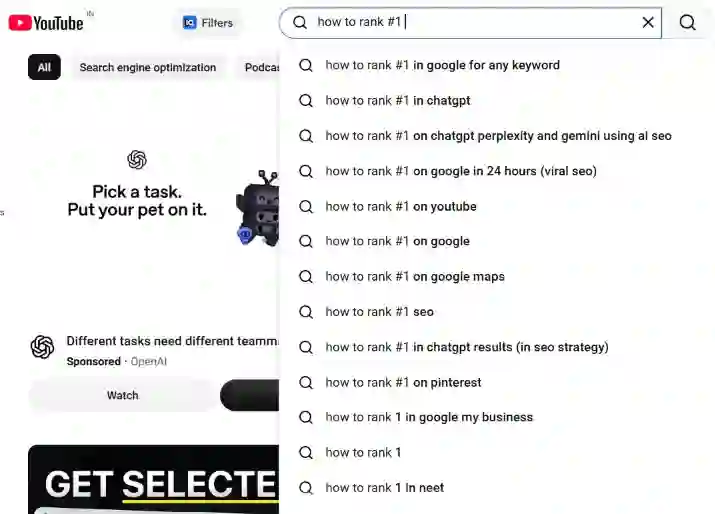
Type a seed into the YouTube search bar and read the list that drops down. Those predictions are the fastest free source of keywords you have, and they come from the platform you are trying to rank on.
One detail changes how you should use them. YouTube says its search predictions are based on factors like popularity and similarity, and that when you are signed in, they also draw on searches you have run and videos you have watched. Sign out or open an incognito window first. Otherwise, you are researching your own habits instead of your audience’s.
Two ways to pull more out of this:
Add a letter: Type your seed, add a space, then work through a, b, c and so on. Each letter returns a different set of phrases.
Follow the thread: Pick a suggestion that looks promising, search it, and read the suggestions that phrase produces.
Copy anything relevant into a document. Twenty to forty phrases is plenty to work with.
Throw out two kinds of suggestions while you collect. Brand names you have nothing to do with will never rank for you, and phrases aimed at a different audience will pull in viewers who leave early. Everything else stays for now, because the next two steps do the filtering.
Step 3: Check demand in the Trends tab in YouTube Studio
Go to YouTube Studio Analytics in the left menu, then click the Trends tab along the top. Enter one of your phrases, and YouTube shows you what its own data says about that search.
Two readings matter for YouTube keyword research:
Audience interest: Rated from very low to very high, drawn from videos watched more than 1,000 times a week over the last 28 days. Anything at medium or above is worth keeping.
Content gaps: YouTube defines these as searches where viewers cannot find enough quality results, either because nothing matches, or because what does match is old or weak. A gap is an opening. Fill it well, and you are the best result on a page that currently has none.
Save the phrases that survive this step. One warning from YouTube’s Help Center: an updated Studio experience started rolling out in July 2026, so your Trends tab may look different from the screenshot below. The data behind it works the same way.
Step 4: Compare interest in Google Trends
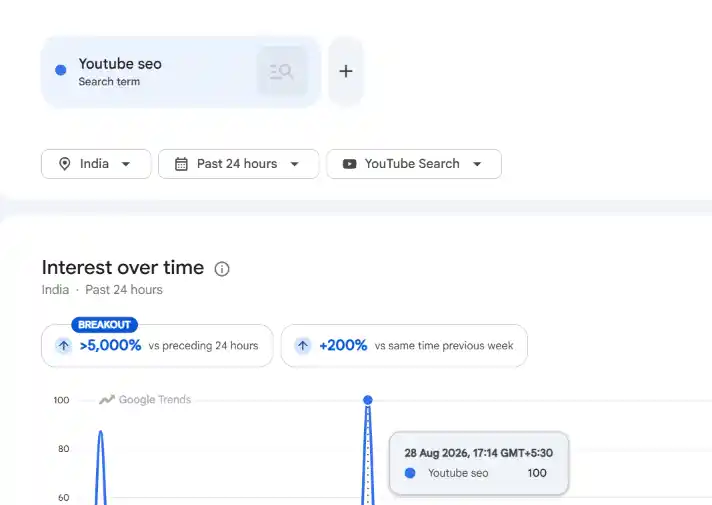
Open Google Trends, type your keyword in, then switch the search type dropdown from Web Search to YouTube Search, a filter Google walks through in its own Google Trends training. That one change swaps the entire data set from what people Google to what people search inside YouTube.
Google Trends adds the one thing the rest of your YouTube keyword research cannot show you, which is direction over time. Read it for that, not for volume. Scores run from 0 to 100 and only compare a keyword against itself over time, so a rising line means growing interest and a spike that fell off means you missed the moment. Set the range to the past 12 months for a normal topic and the past 5 years if you suspect the topic is seasonal.
Then scroll to Related queries and switch the filter from Top to Rising. Those are phrases gaining momentum right now, which is where you find a topic before the rest of your niche gets to it.
Step 5: Search the keyword on YouTube before you commit
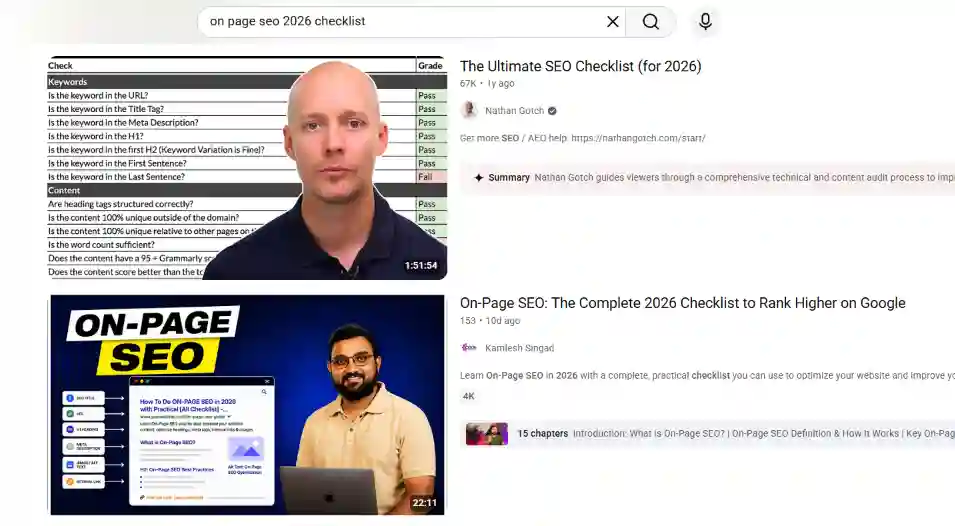
Search your keyword the way a viewer would, in an incognito window, and read the first page properly. Most YouTube keyword research stops one step earlier, at the data, which is why so many creators target a phrase that was never winnable.
Look for four things:
Format: Are the top results tutorials, reviews, or vlogs? YouTube is showing you the format that satisfies this search.
Age: Results from four years ago on a topic that changes yearly means the page is stale and beatable.
Channel size: Videos from channels your size in the top five means the door is open. A page of million-subscriber channels means pick something more specific.
Satisfaction: Read the titles as a searcher, not a creator. If none of them properly answers the query, that is your opening.
How do you Choose Between two Keywords?
Choose the more specific phrase you can fully answer. Specific phrases have fewer searchers, and every one of those searchers wants exactly what you are about to make, which is what pushes a video up the page.
Run both candidates through this:
| Signal | What good looks like | Where you check it |
| Demand | Medium or higher audience interest | Trends tab in YouTube Studio |
| Direction | Flat or rising over 12 months | Google Trends, YouTube Search |
| Intent | Every top result answers the same question | YouTube results page |
| Competition | Channels your size ranking in the top five | YouTube results page |
| Fit | You can make the best version of this video | Your own honest judgment |
A keyword that passes four of the five is a green light. Fail the last one and drop it, however good the numbers look, because YouTube ranks partly on whether viewers stay and whether they were satisfied. Traffic you cannot hold does not help you.
Say a bookkeeping channel is weighing “accounting software” against “how to reconcile bank transactions in QuickBooks”. The first has far more searches, and software brands with huge budgets own the first page. Fewer people search the second one, but every one of them is stuck on a specific task the channel solves every day, and the videos ranking for it are three years old. YouTube keyword research done properly picks the second one, every time.
How to Find Keywords Your Videos Already Rank for
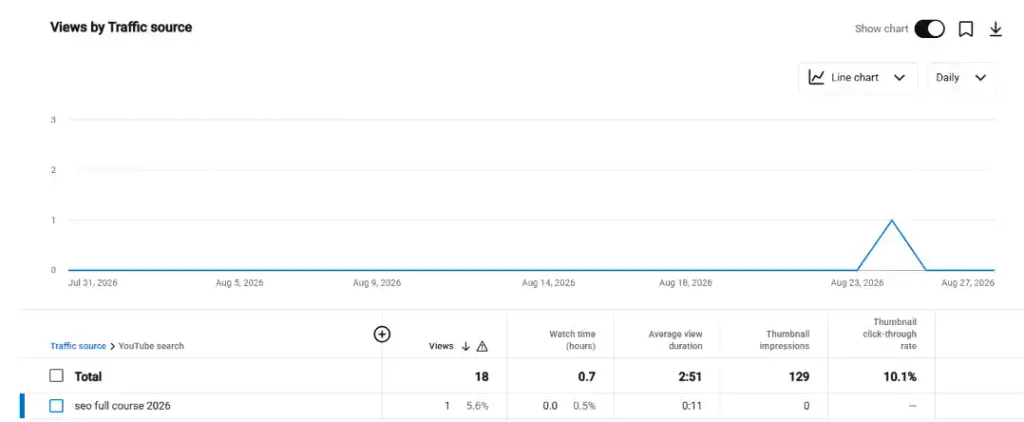
Go to Analytics in YouTube Studio, click Advanced mode, open the Traffic source report, then select YouTube search. You will see the individual phrases people used to find your videos, a drill-down YouTube documents in its guide to Advanced mode.
This is the most underused kind of YouTube keyword research, because it is the only data set here built entirely from your own audience. Read it for surprises. A phrase you never targeted, sitting there sending views, means YouTube worked out that you are relevant for something you never claimed. Add that phrase to the title or description of the video that is already ranking, and you strengthen a signal that was accidental until now.
Where to Put Your Keyword After the Research
Your keyword belongs in four places, and they do not carry equal weight: the title first, then the opening of the description, then the video itself, then tags. This is where YouTube Channel Optimization turns keyword research into clear signals about what your channel and video are actually about.
Title: Put the keyword in naturally and near the front. This is the single strongest place it can sit, and it has to read like something a person would click.
Description: Use the keyword in the first sentence or two, before the fold. A well-written YouTube Video Description should reinforce the topic naturally while giving viewers useful context.
The video itself: Say the phrase out loud in the first thirty seconds. YouTube looks at your video content when it determines relevance, and spoken words are part of that.
Tags: Add a handful and move on. YouTube states plainly that tags play a minimal role in discovery and that title, thumbnail, and description matter more. Tags help mainly when your topic is commonly misspelled.
Never repeat the keyword to hit a number. Stuffing does not lift rankings, and it makes titles read like they were written for a machine, which can hurt YouTube CTR and cost you the click.
How to Find Keywords From Competitor Channels
Competitor channels are one of the fastest sources of proven topics in YouTube keyword research because every video has already been tested against a real audience. Sorting a competitor’s uploads by view count gives you a ranked list of topics that viewers actually responded to, making it easier to identify patterns worth investigating.
Step five validates a phrase you already have. Competitor channels can uncover phrases and topic angles you would never have entered into the search bar yourself.
Sort a Competitor’s Videos by Most Popular
Open the channel, click the Videos tab, then change the sort option from Latest to Popular. YouTube reorders the catalog by view count, giving you an immediate picture of which topics attracted the most attention.
Focus on the outliers, not the average. If a channel normally receives 4,000 views and one video has reached 90,000, investigate what made that topic different. A large gap between normal performance and a single video’s performance can indicate that the subject generated demand beyond the channel’s usual audience.
Outlier videos provide one of the strongest signals in competitor-led YouTube keyword research because they show where a topic significantly exceeded the channel’s baseline.
Choose three to five channels around your own size. Large channels benefit from greater authority and established audiences, so their view counts can reflect channel strength as much as keyword demand.

Read Their Titles, Not Their Tags
Titles reveal the keyword and, more importantly, the way competitors frame the search intent. Record the exact phrasing used in videos that significantly outperformed the channel’s baseline.
Do not overvalue tag-scraping tools. YouTube states that tags play a minimal role in discovery, while the title, thumbnail, and description carry more importance.
Take the phrases you collect and validate them through YouTube search and the Trends tab before committing. A competitor’s success proves that demand existed when the video was published. It does not prove that the keyword remains easy to win today.
Mine the Comments for Unanswered Questions
Comments beneath a competitor’s best-performing videos often reveal questions the original video failed to answer. “How do I do this on a Mac?” and “What about the free version?” are search queries expressed in plain language, and each can represent a potential video topic.
Sort comments by Newest to identify what viewers are asking now rather than relying entirely on questions from years ago. Recurring questions deserve the most attention: one person asking is a comment, while several viewers asking the same thing indicate a content gap.
Use those gaps to create videos that address the search intent more completely than the competing content. That turns competitor research from simple keyword collection into a practical method for finding proven demand and underserved topics.
Frequently Asked Questions
1. Is YouTube keyword research free?
Yes. Researching YouTube keywords costs nothing: search suggestions, the Trends tab in YouTube Studio, and Google Trends set to YouTube Search are all free. Paid tools add convenience, not accuracy.
2. How many keywords should one video target?
One primary keyword per video. Supporting phrases can sit naturally in the description, but a video built around a single clear search query ranks more reliably than one covering several.
3. How often should you research new keywords?
Before every video, demand shifts, and a phrase that worked six months ago may now be crowded, so run the five-step check each time rather than reusing an old list.
4. Do TubeBuddy and VidIQ show real YouTube search volume?
No. YouTube does not publish keyword search volume, so third-party tools show modeled estimates. Treat those numbers as directional, then confirm demand in the Trends tab in YouTube Studio.
5. Can you research YouTube keywords without a channel?
Yes. YouTube search suggestions, Google Trends set to YouTube Search, and the results page all work while signed out. Only the Trends tab in YouTube Studio requires a channel.
What Matters More Than the Keyword
YouTube keyword research tells you what to make. It cannot make the video good.
Search brings the viewer to your thumbnail. Everything after that is retention, and retention determines whether the video continues earning views over time. The objective is not simply to find a keyword with demand. Choose a phrase you can answer more clearly, thoroughly, or usefully than the videos already ranking for it, then build that better answer.
Also Read: Best YouTube SEO Tools to Grow and Optimize Your Channel